Introduction
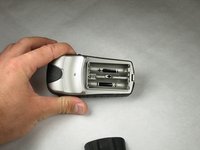
This step illustrates how to properly change the batteries for the device. In addition, this step is a prerequisite for multiple manuals regarding this device.
Ce dont vous avez besoin
-
-
-
Flip the device to the backside, and locate the metal tab at the center of the back cover.
 Demander à FixBot
-
-
-
-
Lift the metal tab up, and rotate it counterclockwise. This will unlock the back case cover.
-
-
-
Lift the battery plate off to either insert or remove 2 AA batteries.
-
-


To reassemble your device, follow these instructions in reverse order.
Annulation : je n'ai pas terminé ce tutoriel.
Une autre personne a terminé cette réparation.

Équipe

Cal Poly, Team 21-30, Regan Fall 2010 Membre de l'équipe Cal Poly, Team 21-30, Regan Fall 2010
CPSU-REGAN-F10S21G30
3 membres
20 tutoriels rédigés
