Aller au contenu principal
Pour réparer ensemble - Je crée un compte

Roku Streaming Stick Macro Button Contacts Replacement

Ce dont vous avez besoin

    1. Roku Streaming Stick Macro Button Contacts Replacement, Macro Button Contacts: étape 1, image 1 de 1
      • Place the remote so that the battery cover is facing upwards.

      Demander à FixBot

      Ajouter un commentaire

    2. Roku Streaming Stick Macro Button Contacts Replacement: étape 2, image 1 de 1
      • Remove the battery cover to expose the battery compartment.

      Demander à FixBot

      Ajouter un commentaire

    3. Roku Streaming Stick Macro Button Contacts Replacement: étape 3, image 1 de 1
      • Remove batteries.

      Demander à FixBot

      Ajouter un commentaire

    4. Roku Streaming Stick Macro Button Contacts Replacement: étape 4, image 1 de 1
      • Use a Phillips #00 screwdriver to remove the 1.5 mm wide screw.

      Demander à FixBot

      Ajouter un commentaire

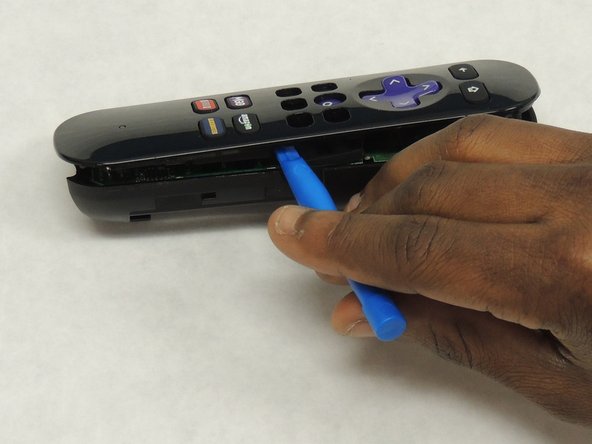
    5. Roku Streaming Stick Macro Button Contacts Replacement: étape 5, image 1 de 2 Roku Streaming Stick Macro Button Contacts Replacement: étape 5, image 2 de 2
      • Use a plastic opening tool to gently pry apart the plastic enclosure. Make sure you create a large enough gap before you attempt to separate the two pieces.

      Demander à FixBot

      Ajouter un commentaire

    6. Roku Streaming Stick Macro Button Contacts Replacement: étape 6, image 1 de 1
      • Gently remove the circuit board or motherboard.

      Demander à FixBot

      Ajouter un commentaire

    7. Roku Streaming Stick Macro Button Contacts Replacement: étape 7, image 1 de 1
      • First, gently remove the three plastic sheets. Then, remove the button panels from the remote control.

      • Repair the contact sheet as noted on the Button Contact Repair Kit listed above. Otherwise replace with new conductive button contacts.

      Demander à FixBot

      Ajouter un commentaire

Conclusion

To reassemble your device, follow these instructions in reverse order.

Annulation : je n'ai pas terminé ce tutoriel.

Feliciano Bandazi

Membre depuis le 04/07/18

145 Réputation

1 tutoriel rédigé

Équipe

IUPUI, Team S2-G2, Wilson Spring 2018 Membre de l'équipe IUPUI, Team S2-G2, Wilson Spring 2018

IUPUI-WILSON-S18S2G2

4 membres

9 tutoriels rédigés

0 commentaires de tutoriel

Ajouter un commentaire

Nombre de vues :

Dernières 24 heures : 1

7 derniers jours : 6

30 derniers jours : 30

Total : 4,076