Cette traduction a été générée automatiquement et n’a pas encore fait l’objet d’une relecture humaine. Vous parlez cette langue ? Relisez-la.

Changement ressort batterie Samsung TL220

chelsa et 6 autres contributeurs
Dernière mise à jour le 17 août 2026
Vues: 1,2 k
Afficher les statistiques :
- Dernières 24 heures :
- 2
- Sept derniers jours :
- 29
- Trente derniers jours :
- 108
- Total :
- 1 170
Commentaires: 0
Personne n'a commenté ce tutoriel. Serez-vous le premier ?
Aller aux commentaires de tutorielTerminé: 2 3
2 personnes ont marqué ce tutoriel comme « terminé ». Serez-vous la prochaine ?
3 personnes ont marqué ce tutoriel comme « terminé ». Dont vous — super travail !
Favoris: 0 1
Personne n'a mis ce tutoriel en favori (ni ne s'y est abonné). Serez-vous le premier ?
1 personne a mis ce tutoriel en favori (et s'y est abonnée) – et c'est vous !
Introduction
Passez à l'étape 1 ↓Si votre Samsung TL220 émet un cliquetis venant de l'intérieur de l'appareil, utilisez ce tutoriel pour changer le ressort de batterie et maintenir la batterie en place.
Le ressort à l'intérieur de l'appareil sert à maintenir la batterie en place. Si le ressort se détache ou ne soutient plus la batterie, cela peut endommager l'intérieur de l'appareil.
Assurez-vous que l'appareil est complètement éteint avant de commencer.
Ce dont vous avez besoin
Outils

-
-
-
Commencez par dévisser les sept vis cruciformes de 4 mm situées à l'extérieur de l'appareil photo.
-
À l'aide de l'outil pour ouvrir en plastique, faites délicatement levier pour ouvrir l'appareil photo, puis soulevez le boîtier arrière pour le retirer.
 Demander à FixBot
-
-
-
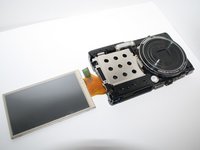
Maintenant que le capot arrière est retiré, déplacez délicatement l'écran LCD de la caméra vers la droite et posez-le face contre la table.
-
Ensuite, dévissez les trois vis cruciformes de 4 mm situées sur le panneau arrière avec le même tournevis.
-
-
-
Outil utilisé dans cette étape :Tweezers$4.99
-
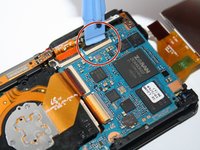
Déclipsez les quatre connecteurs qui maintiennent les nappes orange avec l'outil pour ouvrir.
-
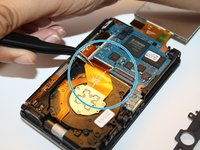
Avec les pincette, retirez délicatement les quatre nappes orange des connecteurs.
-
-
-
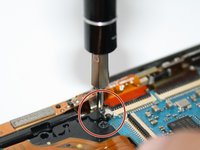
Une fois les bandes de film orange détachées des connecteurs, dévissez la vis cruciforme de 4 mm qui maintient le haut du châssis de la caméra.
-
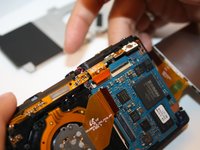
Avec vos doigts, poussez délicatement le châssis supérieur de la caméra vers le haut. Une fois le châssis supérieur de la caméra retiré, vous pouvez également enlever doucement le boîtier avant de la caméra.
-
-
-
Retournez tout l'appareil photo afin que les objectifs soient orientés vers le haut, avec l'écran LCD visible sur le côté.
-
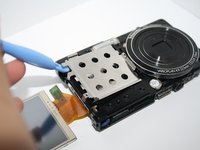
Retirez maintenant le boîtier argenté, comme illustré sur la photo.
-
-
-
Une fois toutes les pièces démontées, vous atteindrez le ressort de l'appareil photo.
-
-







Pour remonter votre appareil, suivez ces instructions en sens inverse.
Annulation : je n'ai pas terminé ce tutoriel.
2 autres ont terminé cette réparation.


