Aller au contenu principal
Pour réparer ensemble - Je crée un compte

Sony Xperia TL Display Assembly Replacement

Ce dont vous avez besoin

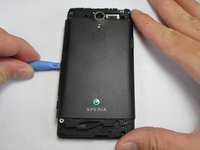
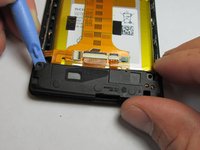
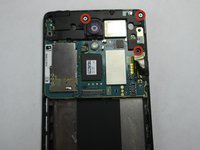
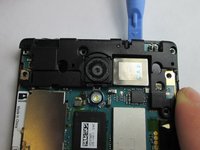
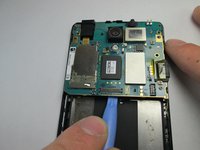
  1. Sony Xperia TL Display Assembly Replacement, Remove Top Plastic Section: étape 1, image 1 de 3 Sony Xperia TL Display Assembly Replacement, Remove Top Plastic Section: étape 1, image 2 de 3 Sony Xperia TL Display Assembly Replacement, Remove Top Plastic Section: étape 1, image 3 de 3
    • Use the plastic opening tool to pry the top plastic section off.

    Demander à FixBot
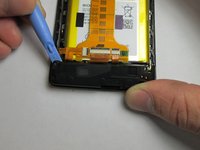
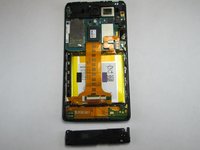
  2. Sony Xperia TL Display Assembly Replacement, Remove Bottom Plastic Section: étape 2, image 1 de 2 Sony Xperia TL Display Assembly Replacement, Remove Bottom Plastic Section: étape 2, image 2 de 2
    • Use the plastic opening tool to pry the bottom plastic section off.

    Demander à FixBot
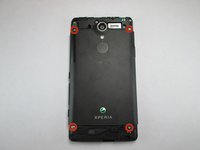
  3. Sony Xperia TL Display Assembly Replacement, Unscrewing the Back Off: étape 3, image 1 de 3 Sony Xperia TL Display Assembly Replacement, Unscrewing the Back Off: étape 3, image 2 de 3 Sony Xperia TL Display Assembly Replacement, Unscrewing the Back Off: étape 3, image 3 de 3
    • Remove the four 5mm screws.

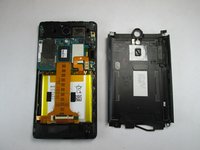
    • Use the plastic opening tool to pry off the back.

    Demander à FixBot
  4. Sony Xperia TL Display Assembly Replacement, Loud Speaker: étape 4, image 1 de 3 Sony Xperia TL Display Assembly Replacement, Loud Speaker: étape 4, image 2 de 3 Sony Xperia TL Display Assembly Replacement, Loud Speaker: étape 4, image 3 de 3
    • Use the plastic opening tool to remove the loud speaker module.

    Demander à FixBot
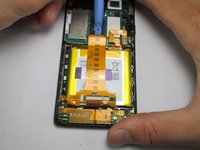
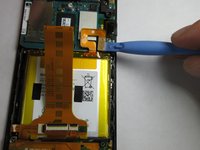
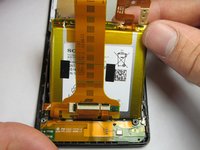
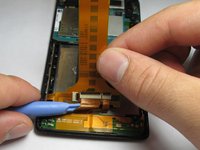
  5. Sony Xperia TL Display Assembly Replacement, Battery: étape 5, image 1 de 3 Sony Xperia TL Display Assembly Replacement, Battery: étape 5, image 2 de 3 Sony Xperia TL Display Assembly Replacement, Battery: étape 5, image 3 de 3
    • Use the plastic opening tool to detach the ribbon running across the battery.

    • Use the plastic opening tool to detach the ribbon connecting the battery to the motherboard.

    Demander à FixBot
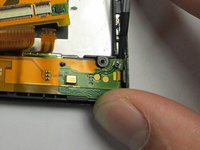
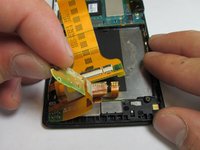
  6. Sony Xperia TL Display Assembly Replacement, Battery Harness: étape 6, image 1 de 3 Sony Xperia TL Display Assembly Replacement, Battery Harness: étape 6, image 2 de 3 Sony Xperia TL Display Assembly Replacement, Battery Harness: étape 6, image 3 de 3
    • Unhook the 2 connections between the harness and phone shell.

    • Using the plastic opening tool, pry the harness up and remove it.

    • There is an adhesive on the bottom half of the battery harness.

    Demander à FixBot
  7. Sony Xperia TL Display Assembly Replacement: étape 7, image 1 de 1
    • The final step is taking the entire harness off of the phone.

    Demander à FixBot
  8. Sony Xperia TL Display Assembly Replacement, Motherboard: étape 8, image 1 de 3 Sony Xperia TL Display Assembly Replacement, Motherboard: étape 8, image 2 de 3 Sony Xperia TL Display Assembly Replacement, Motherboard: étape 8, image 3 de 3
    • Use the Phillips #00 to remove the 3 5mm screws.

    • Lift the plastic cover off.

    • Use the plastic opening tool to pry the motherboard out of the phone shell.

    Demander à FixBot
  9. Sony Xperia TL Display Assembly Replacement, Ear Speaker: étape 9, image 1 de 1
    • Use the plastic opening tool to detach the ear piece speaker.

    • Avoid majorly bending the tiny metal hooks holding the ear piece in.

    Demander à FixBot
  10. Sony Xperia TL Display Assembly Replacement, Display Assembly: étape 10, image 1 de 1
    • Once every single piece is removed from the main screen/digitizer this will be the only remaining piece. Nothing else can be removed. If you need to replace your screen this entire piece must be replaced.

    Demander à FixBot
Conclusion

To reassemble your device, follow these instructions in reverse order.

Une autre personne a terminé cette réparation.

Adam Giniger

Membre depuis le 09/22/14

1 303 Réputation

8 tutoriels rédigés

Équipe

USF Tampa, Team 4-4, Brown Fall 2014 Membre de l'équipe USF Tampa, Team 4-4, Brown Fall 2014

USFT-BROWN-F14S4G4

3 membres

10 tutoriels rédigés

0 commentaires de tutoriel

Ajouter un commentaire

Nombre de vues :

Dernières 24 heures : 2

7 derniers jours : 6

30 derniers jours : 53

Total : 828