Aller au contenu principal
Pour réparer ensemble - Je crée un compte

VTech Learning Tunes Karaoke Power Button Replacement

Ce dont vous avez besoin

    1. VTech Learning Tunes Karaoke Power Button Replacement, Power Button: étape 1, image 1 de 1
      • To remove the battery door, loosen the 4mm screw using a Flathead screwdriver.

      • A coin can also be used to loosen the screw

      Demander à FixBot

      Ajouter un commentaire

    2. VTech Learning Tunes Karaoke Power Button Replacement: étape 2, image 1 de 2 VTech Learning Tunes Karaoke Power Button Replacement: étape 2, image 2 de 2
      • Remove the battery door and take out the batteries.

      Demander à FixBot

      Ajouter un commentaire

    3. VTech Learning Tunes Karaoke Power Button Replacement: étape 3, image 1 de 1
      • Remove the six 9.5 mm Phillips #2 screws.

      • Remove the six 6.0 mm Phillips #2 screws.

      Demander à FixBot

      Ajouter un commentaire

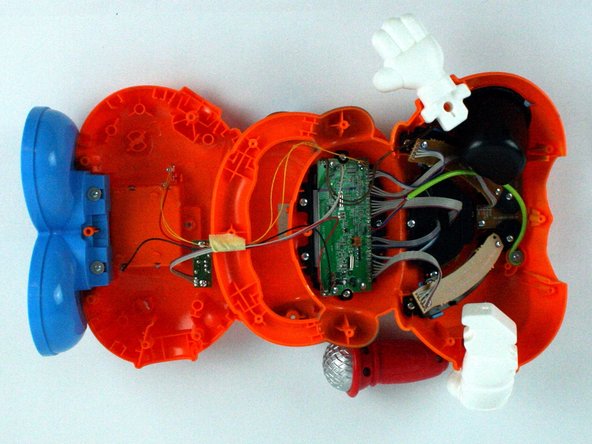
    4. VTech Learning Tunes Karaoke Power Button Replacement: étape 4, image 1 de 2 VTech Learning Tunes Karaoke Power Button Replacement: étape 4, image 2 de 2
      • Gently pull up on the rear panel.

      • Be careful to not pull on the wire connections.

      • Gently place the back panel underneath the top panel with the tops facing each other, as shown in the picture.

      Demander à FixBot

      Ajouter un commentaire

    5. VTech Learning Tunes Karaoke Power Button Replacement: étape 5, image 1 de 1
      • Remove four 7.9 mm screws from the mode selector and voice selector trays.

      Demander à FixBot

      Ajouter un commentaire

    6. VTech Learning Tunes Karaoke Power Button Replacement: étape 6, image 1 de 1
      • Remove the two 5.6 mm screws from the power button board.

      Demander à FixBot

      Ajouter un commentaire

    7. VTech Learning Tunes Karaoke Power Button Replacement: étape 7, image 1 de 1
      • Carefully move the power button board out of the way.

      • From here you can replace the button.

      Demander à FixBot

      Ajouter un commentaire

Conclusion

To reassemble your device, follow these instructions in reverse order.

Annulation : je n'ai pas terminé ce tutoriel.

Gamuchirai Chifamba

Membre depuis le 02/09/16

249 Réputation

2 tutoriels rédigés

Équipe

USF Tampa, Team 7-2, Cheng Spring 2016 Membre de l'équipe USF Tampa, Team 7-2, Cheng Spring 2016

USFT-CHENG-S16S7G2

4 membres

10 tutoriels rédigés

0 commentaires de tutoriel

Ajouter un commentaire

Nombre de vues :

Dernières 24 heures : 1

7 derniers jours : 3

30 derniers jours : 22

Total : 720