Aller au contenu principal
Pour réparer ensemble - Je crée un compte

Zerodate T26 RGB LED Replacement

Ce dont vous avez besoin

    1. Zerodate T26 RGB LED Replacement, Scroll Wheel: étape 1, image 1 de 2 Zerodate T26 RGB LED Replacement, Scroll Wheel: étape 1, image 2 de 2
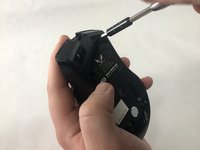
      • Remove the top shell of the mouse by using the iFixit opening tool to carefully pry the top shell apart from the bottom plate.

      Demander à FixBot

      Ajouter un commentaire

    2. Zerodate T26 RGB LED Replacement: étape 2, image 1 de 2 Zerodate T26 RGB LED Replacement: étape 2, image 2 de 2
      Outil utilisé dans cette étape :
      Tweezers
      $4.99
      • Remove the adhesive pads using precision tweezers or the iFixit opening tool.

      • Adhesive pads are located on the bottom of the mouse.

      Demander à FixBot

      Ajouter un commentaire

    3. Zerodate T26 RGB LED Replacement: étape 3, image 1 de 2 Zerodate T26 RGB LED Replacement: étape 3, image 2 de 2
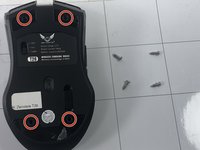
      • Use a Phillips #00 screwdriver to remove all four 10 mm screws.

      Demander à FixBot

      Ajouter un commentaire

    4. Zerodate T26 RGB LED Replacement: étape 4, image 1 de 2 Zerodate T26 RGB LED Replacement: étape 4, image 2 de 2
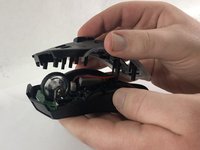
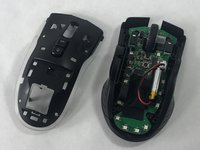
      • Carefully pull the middle shell apart from the bottom plate.

      • The circuit board should then be visible and attached to the bottom plate.

      Demander à FixBot

      Ajouter un commentaire

    5. Zerodate T26 RGB LED Replacement: étape 5, image 1 de 2 Zerodate T26 RGB LED Replacement: étape 5, image 2 de 2
      • Remove the scroll wheel by pushing it to the right and pulling up.

      Demander à FixBot

      Ajouter un commentaire

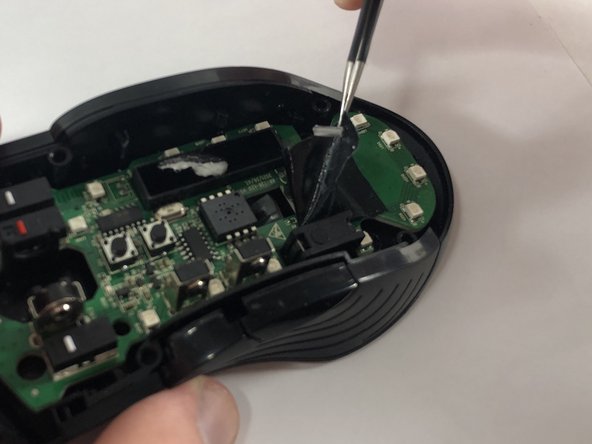
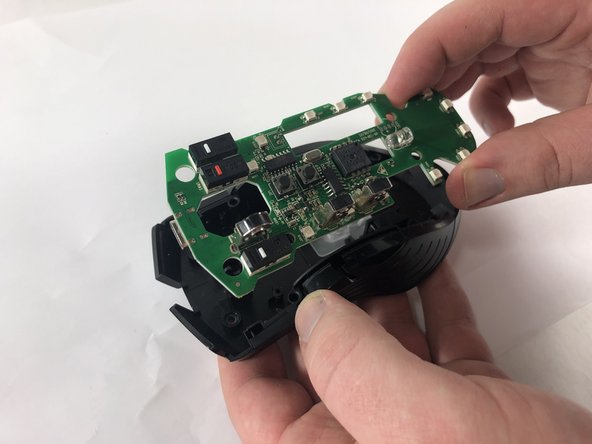
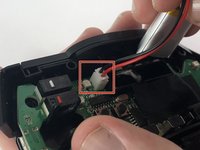
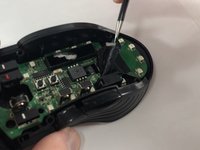
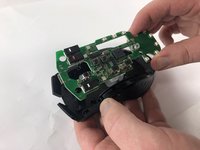
    1. Zerodate T26 RGB LED Replacement, RGB LED: étape 6, image 1 de 3 Zerodate T26 RGB LED Replacement, RGB LED: étape 6, image 2 de 3 Zerodate T26 RGB LED Replacement, RGB LED: étape 6, image 3 de 3
      Outil utilisé dans cette étape :
      Tweezers
      $4.99
      • Disconnect the battery from the circuit board.

      • Use the precision tweezers to remove the tape from the circuit board.

      • Carefully pull apart the circuit board from the bottom shell.

      Demander à FixBot

      Ajouter un commentaire

    2. Zerodate T26 RGB LED Replacement: étape 7, image 1 de 1
      • Desolder the LEDs from the circuit board and solder on the new LEDs following the soldering guide.

      • Please be sure to review safety guidelines and guided steps on soldering/desoldering before attempting remove of LEDs

      Demander à FixBot

      Ajouter un commentaire

Conclusion

To reassemble your device, follow these instructions in reverse order.

Annulation : je n'ai pas terminé ce tutoriel.

Janice Rullan

Membre depuis le 03/13/23

662 Réputation

6 tutoriels rédigés

Équipe

UMass Dartmouth, Team 2-3, Petersen Spring 2023 Membre de l'équipe UMass Dartmouth, Team 2-3, Petersen Spring 2023

UMASSD-PETERSEN-S23S2G3

4 membres

6 tutoriels rédigés

0 commentaires de tutoriel

Ajouter un commentaire

Nombre de vues :

Dernières 24 heures : 1

7 derniers jours : 6

30 derniers jours : 20

Total : 391