Aller au contenu principal
Pour réparer ensemble - Je crée un compte

Zune Flash 2nd Generation Back Cover Replacement

Ce dont vous avez besoin

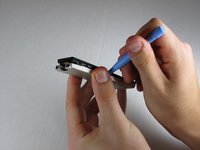
  1. Zune Flash 2nd Generation Back Cover Replacement, Back Cover: étape 1, image 1 de 2 Zune Flash 2nd Generation Back Cover Replacement, Back Cover: étape 1, image 2 de 2
    • Prior to disassembly, verify the hold switch is engaged to ensure the device will not turn on during the procedure.

    • If the device turns on while it is being disassembled it could cause irreversible damage to the device.

    • PICS MAKE NO SENSE.

    Demander à FixBot

    Ajouter un commentaire

  2. Zune Flash 2nd Generation Back Cover Replacement: étape 2, image 1 de 2 Zune Flash 2nd Generation Back Cover Replacement: étape 2, image 2 de 2
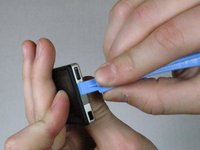
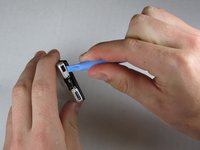
    • Remove the top metal clip by inserting a Zune opening tool in between the faceplate and back cover and pulling gently back as shown in the images.

    • You should hear a 'click' as the clip detaches from the device.

    Demander à FixBot

    Ajouter un commentaire

  3. Zune Flash 2nd Generation Back Cover Replacement: étape 3, image 1 de 1
    • Remove the two screws shown using a Y00 Tri-Wing screwdriver.

    Demander à FixBot

    Ajouter un commentaire

  4. Zune Flash 2nd Generation Back Cover Replacement: étape 4, image 1 de 3 Zune Flash 2nd Generation Back Cover Replacement: étape 4, image 2 de 3 Zune Flash 2nd Generation Back Cover Replacement: étape 4, image 3 de 3
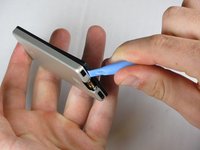
    • Insert the Zune opening tool between the faceplate and the back cover, starting from the top and slowly work your way around the device.

    Demander à FixBot

    Ajouter un commentaire

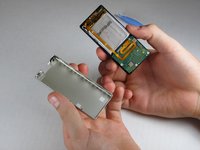
  5. Zune Flash 2nd Generation Back Cover Replacement: étape 5, image 1 de 3 Zune Flash 2nd Generation Back Cover Replacement: étape 5, image 2 de 3 Zune Flash 2nd Generation Back Cover Replacement: étape 5, image 3 de 3
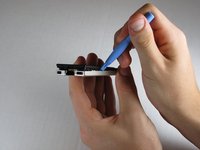
    • Work your way around the Zune until the back cover comes free. Remove the back plate and set it aside.

    Demander à FixBot

    Ajouter un commentaire

Conclusion

To reassemble your device, follow these instructions in reverse order.

Annulation : je n'ai pas terminé ce tutoriel.

ybahman

Membre depuis le 11/01/09

139 Réputation

4 tutoriels rédigés

Équipe

Cal Poly, Team 9-20, Regan Fall 2009 Membre de l'équipe Cal Poly, Team 9-20, Regan Fall 2009

CPSU-REGAN-F09S9G20

5 membres

7 tutoriels rédigés

0 commentaires de tutoriel

Ajouter un commentaire

Nombre de vues :

Dernières 24 heures : 0

7 derniers jours : 7

30 derniers jours : 35

Total : 4,216