Aller au contenu principal
Pour réparer ensemble - Je crée un compte

iHome iM71SC Spring Replacement

Ce dont vous avez besoin

    1. iHome iM71SC Spring Replacement, iHome iM71SC Disassembly: étape 1, image 1 de 1
      • Push down and turn the top of the speaker clockwise. This will release the clips and expand the speaker.

      Demander à FixBot

      Ajouter un commentaire

    2. iHome iM71SC Spring Replacement: étape 2, image 1 de 1
      • Use a #000 Phillips screwdriver to remove the four 1 mm screws from the bottom half of the speaker.

      Demander à FixBot

      Ajouter un commentaire

    3. iHome iM71SC Spring Replacement: étape 3, image 1 de 1
      • Flip the speaker over and use a #000 Phillips screwdriver to remove three 1mm screws . Unscrew these to unfasten the top.

      Demander à FixBot

      Ajouter un commentaire

    4. iHome iM71SC Spring Replacement: étape 4, image 1 de 1
      • Remove the now unfastened coverings to expose the internals of the speaker.

      Demander à FixBot

      Ajouter un commentaire

    1. iHome iM71SC Spring Replacement, Spring: étape 5, image 1 de 1
      • Pry the spring from the speaker housing using the blue plastic pry tool.

      Demander à FixBot

      Ajouter un commentaire

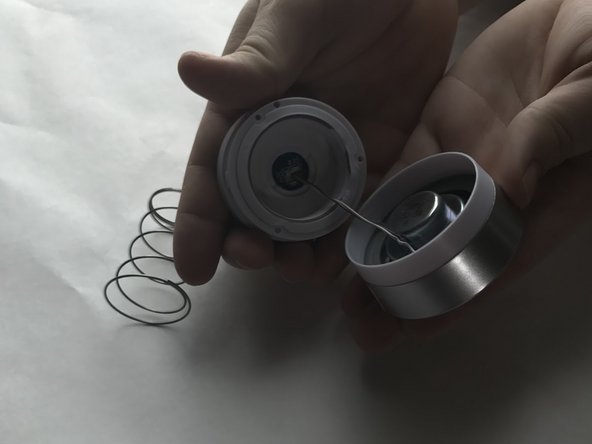
    2. iHome iM71SC Spring Replacement: étape 6, image 1 de 2 iHome iM71SC Spring Replacement: étape 6, image 2 de 2
      • Unwind the old spring from the wires.

      Demander à FixBot

      Ajouter un commentaire

Conclusion

To reassemble your device, follow these instructions in reverse order.

Annulation : je n'ai pas terminé ce tutoriel.

Sarah Brown

Membre depuis le 03/21/17

301 Réputation

3 tutoriels rédigés

Équipe

UMass Dartmouth, Team S7-G5, Julie Spring 2017 Membre de l'équipe UMass Dartmouth, Team S7-G5, Julie Spring 2017

UMASSD-JULIE-S17S7G5

5 membres

8 tutoriels rédigés

0 commentaires de tutoriel

Ajouter un commentaire

Nombre de vues :

Dernières 24 heures : 0

7 derniers jours : 1

30 derniers jours : 12

Total : 296