
Cartouche d'imprimante
Cette traduction a été générée automatiquement et n’a pas encore fait l’objet d’une relecture humaine. Vous parlez cette langue ? Relisez-la.
|
1 Réponse Indice de 0 |
How do I put the ink cartridge in the printer |
|
2 Réponses Indice de 2 |
It will not feed and making loud sound |
|
1 Réponse Indice de 0 |
Canon BJC-85 Broken belt |
Voici quelques outils couramment utilisés pour travailler sur cet appareil. Vous ne devriez pas avoir besoin de tous les outils pour chaque procédure.
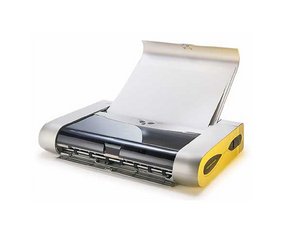
La puissante et compacte imprimante Canon Bubble Jet i80 dispose d'une connexion sans fil, grâce à sa compatibilité IrDA et une interface Bluetooth en option, lui permettant de recevoir des transmissions sans fil depuis des appareils portables courants. Pour garantir une portabilité maximale, Canon a développé plusieurs accessoires optionnels, tels qu'un adaptateur voiture et un kit batterie rechargeable permettant une alimentation lors de vos déplacements.
Ce produit n'est plus commercialisé.
Vous pouvez identifier votre Bubble Jet i80 grâce à la marque, au nom du modèle et au numéro imprimés sur le dessus de l'imprimante (sous le capot). Vous trouverez le numéro de série alphanumérique à 9 chiffres imprimé sur une étiquette située à l'arrière, sur le côté ou à l'intérieur de votre appareil. Pour obtenir de l'aide supplémentaire afin d'identifier votre imprimante, consultez la page de support Canon.
Type d'imprimante : matricielle et jet d'encre couleur
Format de papier maximum pour enveloppe - US # 10 - Com10 (10,5 cm x 24,1 cm)
Feuille - 10 cm x 15 cm
Feuille - 13 cm x 18 cm
Feuille - US Legal (21,6 cm x 35,6 cm)
Feuille - US Letter (21,6 cm x 27,9 cm)
Capacité maximale des bacs standard : 30 feuilles
Langages d'imprimante pris en charge : ESC/P2
Hauteur : 5 cm
Largeur : 31,5 cm
Profondeur : 17,5 cm
Poids : 1,8 kg
Vitesse d'impression monochrome : 14 ppm
Vitesse d'impression couleur : 10 ppm
Résolution optique horizontale monochrome : 600 ppp
Résolution optique verticale monochrome : 600 ppp
Résolution optique verticale couleur : 1200 ppp
Résolution optique horizontale couleur : 4800 ppp
JMU-ALLEN-F11S2G3
2 membres
12 tutoriels rédigés
Dernières 24 heures : 4
7 derniers jours : 16
30 derniers jours : 57
Total : 10,271



