
Aller au contenu principal
Pour réparer ensemble - Je crée un compte

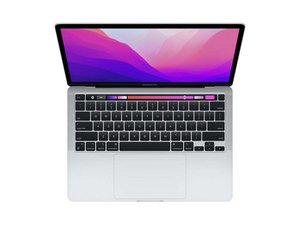
Tutoriels et instructions de réparation pour le Macbook Pro 13" avec puce Apple de 2e génération (M2) et écran Retina de 13,3 pouces. Modèle A2338. Première sortie le 15 juillet 2022 à la WWDC 2022 aux côtés du Macbook Air M2.

MacBook Keyboard Spill Not Working

Macbook was on when around half a cup of saline solution was spilled on it. Tried to wipe it off right away and the laptop stayed on. Keyboard wasn’t working so the laptop was still on when I flipped the laptop upside down. The keyboard eventually started working so I turned the laptop off but still kept the laptop upside down. Used a blowdrier to dry it for around ten minutes. Now the display works perfectly fine but the keyboard is non functional. Touch bar doesn’t turn on, keys can’t type, and trackpad doesn’t work. Apple store said repair would be $1000 but I feel like I could fix it myself for less. How should I go about fixing this? Thanks!

Répondre à cette question J'ai le même problème

Cette question est-elle utile ?

Indice 0
Ajouter un commentaire

1 Réponse

Salt water corrodes electrical circuits! Hopefully it stopped at the keyboard/touchpad.

You'll need to either replace the full uppercase assembly (which I strongly recommend) or locate the raw keyboard and fight through the ton of plastic rivets! Most people end up distorting the Uppercase shell in the process and so far I haven't seen any M2 keyboards offered, I'm not sure if the M1 is a direct fit or not.

Then you have the Touchpad to deal with as well if it was damaged too.

Here's the Apple Repair manual 2022 13" M2 system Review Page 158 as well as Page 8 which offers the P/N info.

Cette réponse est-elle utile ?

Indice 0
Ajouter un commentaire

Ajouter une réponse

Lexie sera éternellement reconnaissant.
Nombre de vues :

Dernières 24 heures : 0

7 derniers jours : 1

30 derniers jours : 12

Total : 312