Aller au contenu principal
Pour réparer ensemble - Je crée un compte

ANKER SoundCore Charging Port Replacement

Ce dont vous avez besoin

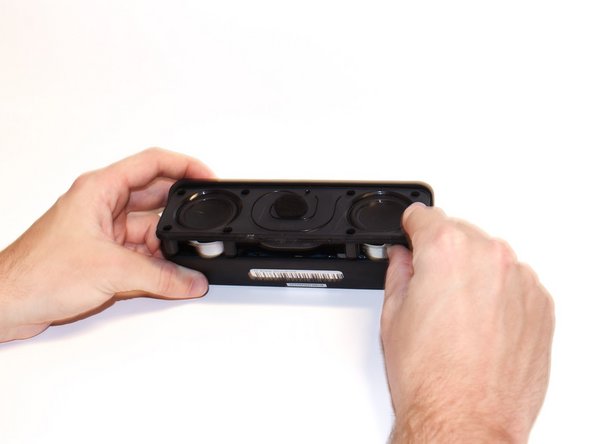
    1. ANKER SoundCore Charging Port Replacement, Charging Port: étape 1, image 1 de 3 ANKER SoundCore Charging Port Replacement, Charging Port: étape 1, image 2 de 3 ANKER SoundCore Charging Port Replacement, Charging Port: étape 1, image 3 de 3
      • Use the plastic opening tool to pry off the screen.

      • Remove the screen from the device.

      Demander à FixBot

      Ajouter un commentaire

    2. ANKER SoundCore Charging Port Replacement: étape 2, image 1 de 1
      • Remove the eight 10 mm Phillips #0 screws from the speaker mount.

      Demander à FixBot

      Ajouter un commentaire

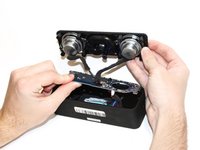
    3. ANKER SoundCore Charging Port Replacement: étape 3, image 1 de 2 ANKER SoundCore Charging Port Replacement: étape 3, image 2 de 2
      • Use the metal spludger to pry off speaker mount.

      Demander à FixBot

      Ajouter un commentaire

    4. ANKER SoundCore Charging Port Replacement: étape 4, image 1 de 1
      • Remove the two 8mm Phillips #0 screws from the circuit board.

      Demander à FixBot

      Ajouter un commentaire

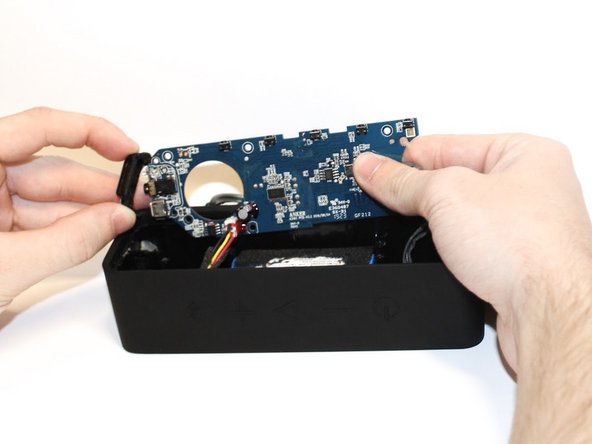
    5. ANKER SoundCore Charging Port Replacement: étape 5, image 1 de 2 ANKER SoundCore Charging Port Replacement: étape 5, image 2 de 2
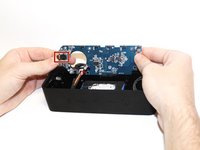
      • Carefully remove the circuit board from the speaker body.

      Demander à FixBot

      Ajouter un commentaire

    6. ANKER SoundCore Charging Port Replacement: étape 6, image 1 de 2 ANKER SoundCore Charging Port Replacement: étape 6, image 2 de 2
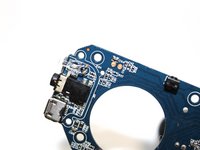
      • Use the iFixit Opening Pick to pry off the charging port cover.

      • Remove the charging port cover.

      Demander à FixBot

      Ajouter un commentaire

    7. ANKER SoundCore Charging Port Replacement: étape 7, image 1 de 2 ANKER SoundCore Charging Port Replacement: étape 7, image 2 de 2
      • Desolder the charging port from the circuit board.

      • Solder a new charging port in place of the old one.

      • For help soldering and desoldering, follow this guide.

      Demander à FixBot

      Ajouter un commentaire

Conclusion

To reassemble your device, follow these instructions in reverse order.

Annulation : je n'ai pas terminé ce tutoriel.

3 autres ont terminé cette réparation.

Briana Kuo

Membre depuis le 02/10/20

311 Réputation

1 tutoriel rédigé

Équipe

Cal Poly, Team S22-G1, Regan Winter 2020 Membre de l'équipe Cal Poly, Team S22-G1, Regan Winter 2020

CPSU-REGAN-W20S22G1

5 membres

17 tutoriels rédigés

4 commentaires de tutoriel

Where can I find a replacement port that is compatible?

tommy2197 - Réponse Partager

Where can I find a replacement port that is compatible?

Mike - Réponse Partager

The Charging port is an USB Mirco Port. To find right part search for JBL FLIP 3 on ebay or other platforms. It is the same part as used for the Anker SoundCore.

Agi - Réponse Partager

Hi I have a Anker soundcore motion plus, the charging port is loose and not charging, it's a usb c, where can I buy that replacement part

.thanks

Justin - Réponse Partager

Ajouter un commentaire

Nombre de vues :

Dernières 24 heures : 6

7 derniers jours : 29

30 derniers jours : 131

Total : 13,735