Aller au contenu principal
Pour réparer ensemble - Je crée un compte

Anker Soundcore Motion 300 Drivers Replacement

Ce dont vous avez besoin

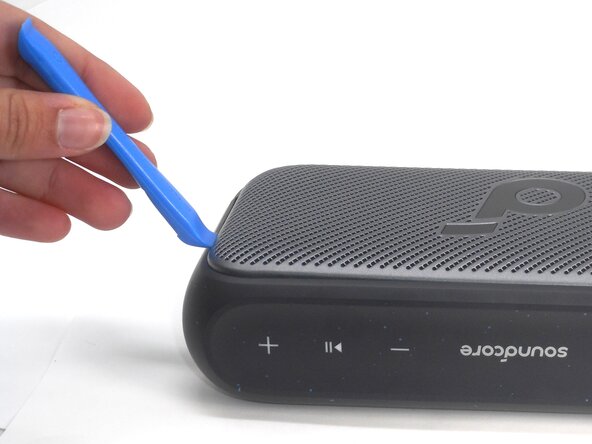
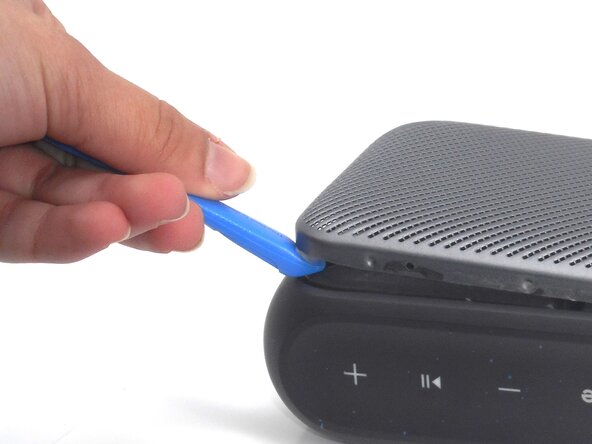
    1. Anker Soundcore Motion 300 Drivers Replacement, Speaker Grille: étape 1, image 1 de 2 Anker Soundcore Motion 300 Drivers Replacement, Speaker Grille: étape 1, image 2 de 2
      • Insert an opening tool into a seam between the grille and chassis.

      • Gently pry the grille up to begin disengaging the retaining clip.

      • Once a corner starts to lift, slowly slide the tool along the edge to loosen more of the grille.

      Demander à FixBot

      Ajouter un commentaire

    2. Anker Soundcore Motion 300 Drivers Replacement: étape 2, image 1 de 2 Anker Soundcore Motion 300 Drivers Replacement: étape 2, image 2 de 2
      • Keep working around the edges until all the clips are loose.

      • You may hear soft clicking sounds as the clips come undone.

      Demander à FixBot

      Ajouter un commentaire

    3. Anker Soundcore Motion 300 Drivers Replacement: étape 3, image 1 de 1
      • Carefully remove the grille from the speaker.

      Demander à FixBot

      Ajouter un commentaire

    1. Anker Soundcore Motion 300 Drivers Replacement, Drivers: étape 4, image 1 de 3 Anker Soundcore Motion 300 Drivers Replacement, Drivers: étape 4, image 2 de 3 Anker Soundcore Motion 300 Drivers Replacement, Drivers: étape 4, image 3 de 3
      • Use a Phillips #0 screwdriver to remove all eight 11.5 mm screws that secure the driver housing.

      Demander à FixBot

      Ajouter un commentaire

    2. Anker Soundcore Motion 300 Drivers Replacement: étape 5, image 1 de 3 Anker Soundcore Motion 300 Drivers Replacement: étape 5, image 2 de 3 Anker Soundcore Motion 300 Drivers Replacement: étape 5, image 3 de 3
      • Use an opening tool to pry up the speaker housing.

      • Set the speaker housing beside the speaker, with care not to strain the cables connected to the drivers.

      • The speaker housing may be very difficult to remove due to adhesive. If necessary, use a hairdryer to lightly heat the perimeter of the housing to loosen the adhesive.

      Demander à FixBot

      Ajouter un commentaire

    3. Anker Soundcore Motion 300 Drivers Replacement: étape 6, image 1 de 3 Anker Soundcore Motion 300 Drivers Replacement: étape 6, image 2 de 3 Anker Soundcore Motion 300 Drivers Replacement: étape 6, image 3 de 3
      • With a Phillips #0 screwdriver, remove the four 7.5 mm screws that secure the driver.

      • Repeat the previous bullet for the other driver.

      • Gently lift off the drivers; the speakers may be slightly glued or stuck to the plastic plate so try not pull on the wiring attaching the components.

      • Disconnect each of the the two driver connectors from the motherboard.

      • There may be a small piece of sealant that must be removed before the connectors can be removed.

      • Remove the drivers.

      Demander à FixBot

      Ajouter un commentaire

Conclusion

To reassemble your device, follow the above steps in reverse order.
Take your e-waste to an R2 or e-Stewards certified recycler.
Repair didn’t go as planned? Try some basic troubleshooting or ask our Answers community for help.

Annulation : je n'ai pas terminé ce tutoriel.

Holly Hoffman

Membre depuis le 02/17/25

487 Réputation

5 tutoriels rédigés

Équipe

University of Memphis, Team 1-2, Sneed Spring 2025 Membre de l'équipe University of Memphis, Team 1-2, Sneed Spring 2025

UM-SNEED-S25S1G2

4 membres

23 tutoriels rédigés

0 commentaires de tutoriel

Ajouter un commentaire

Nombre de vues :

Dernières 24 heures : 3

7 derniers jours : 32

30 derniers jours : 67

Total : 656