Introduction
If your phone's battery seems to drain very quickly and it can no longer hold a charge, you may consider replacing your phone's battery. This guide will help you quickly and easily change the battery in your Punkt MP02. Check our battery troubleshooting page to ensure that your phone requires a new battery first. Before you begin, backup important data, and power off the device to ensure no data loss throughout the process.
If the battery is puffy or swollen, the battery is a fire hazard. Carefully remove and handle it according to iFixit's guide on handling swollen batteries.
Ce dont vous avez besoin
-
-
Use a SIM card eject tool to to eject and remove the SIM card tray on the side of the phone.
 Demander à FixBot
-
-
-
Slide a Jimmy into the seam between the back panel and the chassis.
-
Slide the Jimmy around the perimeter to release the back panel, with care not to damage the retaining clips.
-
-
-
-
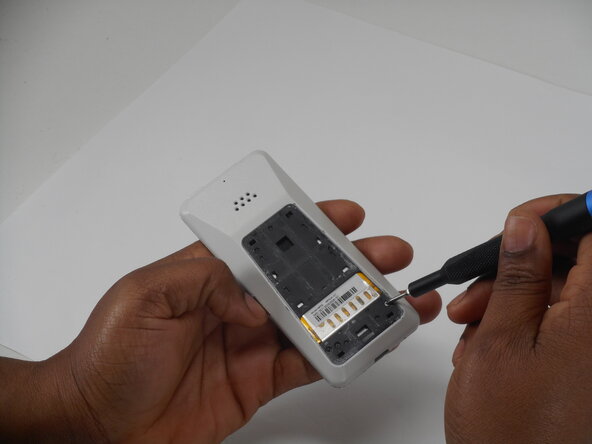
Use a Phillips screwdriver to remove the two adjacent 3 mm Phillips screws.
-
-
-
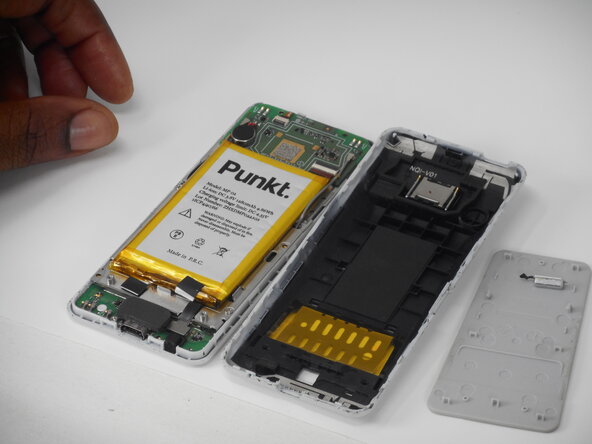
Insert a Jimmy into the seam between the front and back case.
-
Slide the Jimmy around the perimeter while prying to separate the front and back case.
-
-
-
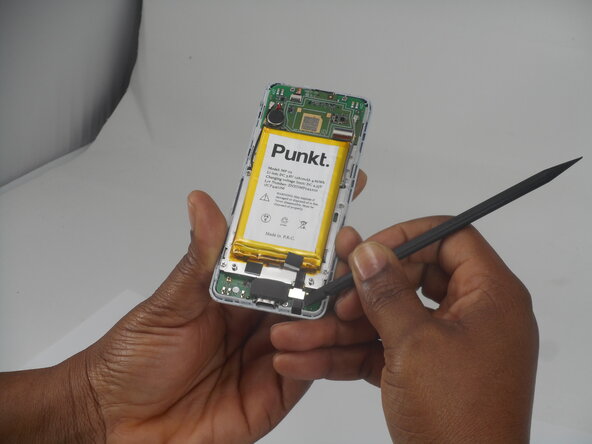
Use a spudger to pry up and disconnect the battery press connector.
-








To reassemble your device, follow the above steps in reverse order.
For optimal performance, after completing this guide, calibrate your newly installed battery.
Take your e-waste to an R2 or e-Stewards certified recycler.
Repair didn’t go as planned? Try some basic troubleshooting or ask our Answers community for help.

Équipe

University of Memphis, Team 1-3, Sneed Spring 2026 Membre de l'équipe University of Memphis, Team 1-3, Sneed Spring 2026
UM-SNEED-S26S1G3
3 membres
10 tutoriels rédigés
