Cette traduction a été générée automatiquement et n’a pas encore fait l’objet d’une relecture humaine. Vous parlez cette langue ? Relisez-la.
Introduction
Les transducteurs audio du casque sont responsables de la production de tout le son que vous entendez. Avec le temps, ils peuvent tomber en panne en raison de l'usure, de dommages physiques ou de problèmes électriques, entraînant un son déformé, des bourdonnements ou une perte totale de l'audio dans une oreille. Ce tutoriel vous montrera comment ouvrir la coquille en toute sécurité et remplacer un transducteur audio défectueux. Effectuer cette réparation peut rétablir un son clair et complet, et prolonger la durée de vie de votre casque Sennheiser HD205.
Ce dont vous avez besoin
-
-
-
Avec vos mains, retirez délicatement les coussinets des Sennheiser HD205 en les tirant hors de la coquille.
 Demander à FixBot
-
-
-
-
-
-
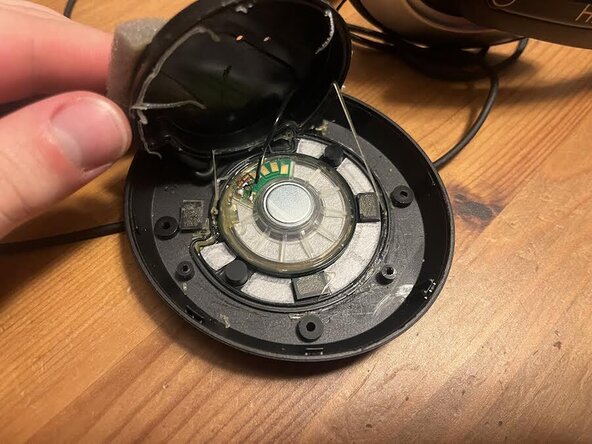
À l'aide d'un embout de tournevis taille 00, retirez les quatre vis et le cache en plastique du casque. Retournez le cache en plastique pour découvrir l'arrière des haut-parleurs.
-
-
-
Utilisez un sèche-cheveux pour ramollir la colle, puis faites levier pour soulever le cache protecteur
-
Remplacez les tournevis
-
-




Pour remonter votre appareil, suivez ces instructions en sens inverse. Déposez vos déchets électroniques dans un point de recyclage certifié.

Équipe

UMass Dartmouth, Team 2-3, Bowman Fall 2025 Membre de l'équipe UMass Dartmouth, Team 2-3, Bowman Fall 2025
UMASSD-BOWMAN-F25S2G3
4 membres
24 tutoriels rédigés
