Introduction
Ce remplacement d'écran s'applique si celui-ci est fissuré, ou si, après avoir suivi les instructions du tutoriel de diagnostic, il ne répond toujours pas.
C'est une procédure simple qui va permettre de retrouver votre appareil comme neuf et le faire fonctionner à nouveau.
Attention: le remplacement de l'écran endommage
l'adhésif étanche.
Ce dont vous avez besoin
-
-
-
Tenez le tournevis métallique, équipé d'un embout Torx T5, dans votre main dominante.
-
Tenez le tournevis en caoutchouc, équipé d'un embout Torx T6, dans votre autre main.
-
Tout en maintenant le tournevis en caoutchouc en place, dévissez simultanément la goupille (dans le sens inverse des aiguilles d'une montre) avec le tournevis métallique dans votre main dominante.
 Demander à FixBot
-
-
-
Une fois la vis de 1 mm retirée, réinsérez le tournevis en métal dans ce même trou.
-
Poussez délicatement la goupille du bracelet. Elle commencera à ressortir par l'autre extrémité.
-
Avec vos doigts, saisissez la goupille exposée et faites-la glisser pour la retirer. Le bracelet devrait maintenant être déconnecté de l'appareil.
-
-
-
-
-
Placez votre iOpener chauffé sur l'écran pour faire ramollir l'adhésif.
-
Après quelques minutes, l'iOpener peut être retiré.
-
-
-
-
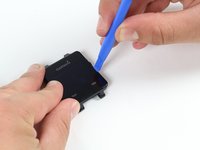
Placez l'outil d'ouverture en plastique bleu entre l'écran et le boîtier en plastique de la montre et soulevez délicatement un côté de l'écran.
-
-
-
Une fois que le premier côté est libre, insérez-y un médiator bleu entre l'écran et la montre.
-
Continuez de décoller les quatre côtés de l'écran pour rompre la liaison adhésive.
-
-
-
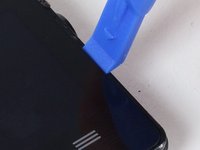
Utilisez l'outil d'ouverture en plastique bleu pour soulever le côté de la vitre. Soulevez jusqu'à ce que vous puissiez y insérer votre ongle.
-
Faites la même chose du côté opposé de la montre jusqu’à ce que vous ayez une prise suffisante sur l'écran.
-
-
-
Saisissez délicatement l'écran des deux côtés.
-
Soulevez avec précaution l'écran de la montre. Séparez-le juste assez pour ne pas abîmer la connexion avec la carte mère.
-
-
-
Détachez la languette orange qui connecte l'écran à la carte mère en la soulevant délicatement avec un outil d'ouverture plastique.
-
Après cette étape, l'écran est complètement détaché du reste de la montre.
-
-




Pour rassembler votre Garmin Vivoactive, il suffit de suivre les instructions dans le sens inverse.
Annulation : je n'ai pas terminé ce tutoriel.
16 autres ont terminé cette réparation.
Merci à ces traducteurs :
100%


Ces traducteurs nous aident réparer le monde ! Vous voulez contribuer ?
Commencez à traduire ›

Équipe

Cal Poly, Team 1-21, Maness Fall 2015 Membre de l'équipe Cal Poly, Team 1-21, Maness Fall 2015
CPSU-MANESS-F15S1G21
4 membres
60 tutoriels rédigés
40 commentaires de tutoriel
Does anyone knows where can I buy a vivoactive display?
Did anyone ever find a location where you can order a replacement screen?
Dylan
I've called Garmin support service but they said that displays units are not for sale from their side, only entire watch can be sold. I find it quite strange for not saying stupid because it's normal that using a watch displays can have a problem or that can be broken and easily fixed by replace them.
Being that said, if someone finds an alternative please share it, thanks
