



Questions populaires sur le forum
Poser une questionIl n'y a pas encore de questions. Soyez le premier à poser une question !
Informations générales
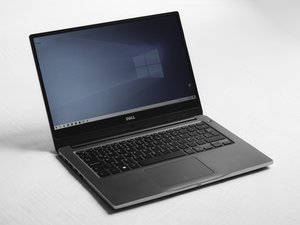
Le Dell Inspiron 14 3473 est un ordinateur portable 14 pouces qui fait partie de la série Inspiron 3000 de Dell. Il est conçu pour les tâches du quotidien, comme naviguer sur le Web, travailler sur des documents et regarder des vidéos. De nombreux étudiants et particuliers l'utilisent régulièrement, et vous pourrez facilement en trouver sur le marché de l'occasion. Le Dell Inspiron 14 3473 est un ordinateur portable simple. Il est destiné aux tâches quotidiennes, comme consulter ses e-mails ou travailler sur des documents. Il est généralement équipé d'un écran 14 pouces HD avec une définition de 1366 x 768 pixels. Vous pouvez le trouver avec différents processeurs Intel, tels que Celeron, Pentium ou Core i3, selon la configuration. Il dispose également de 4 Go ou 8 Go de mémoire DDR4. Vous avez le choix entre plusieurs options de stockage : les disques durs classiques ou les disques SSD plus récents. Cet appareil possède de nombreuses possibilités de connexion, notamment des ports USB-A, un port HDMI, un lecteur de carte SD et une prise jack. Il est alimenté par une batterie lithium-ion à 3 cellules. À l'origine, il était livré avec Windows 10.
Identification
Avant de commencer toute réparation, assurez-vous de bien disposer d'un Dell Inspiron 14 3473. Vous trouverez généralement le numéro de modèle sous l'appareil. Une vérification rapide vous le confirmera. Jetez un coup d'œil à l'étiquette située sur le cache inférieur ; elle doit indiquer « Inspiron 14 3473 ». Vous trouverez également le numéro de service Dell (service tag) sous votre ordinateur portable. Saisissez ce numéro de service sur le site d'assistance de Dell pour vérifier la configuration. Assurez-vous que l'appareil dispose d'un écran 14 pouces non tactile et que les ports de l'Inspiron se trouvent aux emplacements habituels. Il est très important d'utiliser le numéro de service. Certains modèles Inspiron peuvent se ressembler, mais leurs composants internes sont souvent très différents.
Spécifications
Modèle : Dell Inspiron 14 3473
Affichage :
Écran 14 pouces
Définition : 1366 × 768 pixels
Processeur :
Intel Celeron / Pentium / Core i3 (selon la configuration)
Mémoire :
4 Go ou 8 Go DDR4
Stockage :
HDD 500 Go ou SSD (varie selon la configuration)
Ports et connectivité :
Ports USB-A
Port HDMI
Lecteur de carte SD
Prise jack
Batterie :
Batterie lithium-ion à 3 cellules
Système d'exploitation :
Windows 10 (configuration d'origine)
Liens vers les sources des spécifications : Support Dell Inspiron 14 3473

